Run
XML常用部分结构
w:r
|
|-- w:rPr
|   |-- w:rFonts
|   |-- w:b
|   |-- w:bCs
|   |-- w:i
|   |-- w:iCs
|   |-- w:strike
|   |-- w:color
|   |-- w:sz
|   |-- w:szCs
|   |-- w:highlight
|   |-- w:cs
|   |-- w:u
|
|-- w:tXML层级结构例子
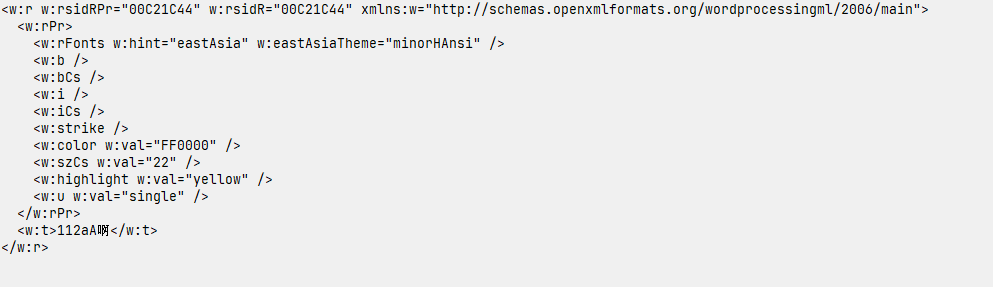
如何创建一个简单的Run
c#
DocumentFormat.OpenXml.Wordprocessing.Run run = new DocumentFormat.OpenXml.Wordprocessing.Run();

run.Append(new DocumentFormat.OpenXml.Wordprocessing.Text("这是一个普通的Run"));xml
<w:r xmlns:w="http://schemas.openxmlformats.org/wordprocessingml/2006/main">
  <w:rPr>
    <w:rFonts w:hint="eastAsia" />
  </w:rPr>
  <w:t>这是一个普通的Run</w:t>
</w:r>如何创建一个换行Run
c#
DocumentFormat.OpenXml.Wordprocessing.Run brRun = new DocumentFormat.OpenXml.Wordprocessing.Run();

run.Append(new DocumentFormat.OpenXml.Wordprocessing.Break());xml
<w:r xmlns:w="http://schemas.openxmlformats.org/wordprocessingml/2006/main">
  <w:br />
</w:r>如何在Office软件中的段落里新增一个Run
通过使用 shift+enter 可以在Office软件中的段落里新增一个Run
w:r
| 属性 | 类型 | 说明 |
|---|---|---|
| w:rsidR | string | 表示该 Run(文本片段)的修订标识符,记录最后一次修改此 Run 的用户会话 ID |
| w:rsidRPr | string | 表示该 Run 的 格式属性(RPr) 的修订标识符,记录最后一次修改其样式(如加粗、颜色)的用户会话 ID |
w:rpr
RunProperties 类
w:rFonts
RunFonts 类
与字体相关
| 属性 | 类型 | 说明 |
|---|---|---|
| w:ascii | string | 设置ASCII字符(拉丁字母、数字、符号)的字体名 |
| w:asciiTheme | EnumValue<ThemeFontValues?> | 指定ASCII字符使用的主题字体,比如主题中的主要字体或次要字体 |
| w:complexScript | string | 设置复杂脚本(如阿拉伯语、希伯来语)的具体字体名称 |
| w:complexScriptTheme | EnumValue<ThemeFontValues?> | 复杂脚本字符的主题字体引用 |
| w:eastAsia | string | 设置东亚字符(中日韩)的具体字体名称 |
| w:eastAsiaTheme | EnumValue<ThemeFontValues?> | 东亚字符的主题字体引用 |
| w:hAnsi | string | 设置扩展ANSI字符(西欧语言)的具体字体名称 |
| w:hAnsiTheme | EnumValue<ThemeFontValues?> | 扩展ANSI字符的主题字体引用 |
| w:hint | EnumValue<FontTypeHintValues?> | 用于字体提示,指定优先使用哪种字体 |
c#
 DocumentFormat.OpenXml.Wordprocessing.RunFonts fonts = new DocumentFormat.OpenXml.Wordprocessing.RunFonts();

 fonts.Ascii = new StringValue("仿宋_GB2312");
 fonts.EastAsia = new StringValue("仿宋_GB2312");
fonts.Hint = new EnumValue<FontTypeHintValues>(FontTypeHintValues.EastAsia);xml
<w:rFonts w:hint="eastAsia" w:ascii="仿宋_GB2312" w:eastAsia="仿宋_GB2312" />IMPORTANT
字体需要在电脑中存在,否则导出文件的时候会使用系统默认字体
w:b
Bold 类
与加粗相关
| 属性 | 类型 | 说明 |
|---|---|---|
| w:val | EnumValue<OnOffValues?> | 指定是否加粗,默认值为true |
c#
DocumentFormat.OpenXml.Wordprocessing.Bold bold = new DocumentFormat.OpenXml.Wordprocessing.Bold(){Val = new OnOffValue(true)};xml
<w:b />w:bCs
BoldComplexScript 类
与复杂脚本(如阿拉伯语、希伯来语)的加粗相关
| 属性 | 类型 | 说明 |
|---|---|---|
| w:val | EnumValue<OnOffValues?> | 指定是否加粗,默认值为true |
c#
DocumentFormat.OpenXml.Wordprocessing.BoldComplexScript boldComplexScript = new BoldComplexScript(){ Val = new OnOffValue(true) };xml
<w:bCs w:val="true"/>w:i
Italic 类
与斜体相关
| 属性 | 类型 | 说明 |
|---|---|---|
| w:val | EnumValue<OnOffValues?> | 指定是否斜体,默认值为true |
c#
DocumentFormat.OpenXml.Wordprocessing.Italic italic = new DocumentFormat.OpenXml.Wordprocessing.Italic(){ Val = new OnOffValue(true) };xml
<w:i w:val="true"/>w:iCs
ItalicComplexScript 类
与复杂脚本(如阿拉伯语、希伯来语)的斜体相关
| 属性 | 类型 | 说明 |
|---|---|---|
| w:val | EnumValue<OnOffValues?> | 指定是否斜体,默认值为true |
c#
DocumentFormat.OpenXml.Wordprocessing.ItalicComplexScript italicComplexScript = new DocumentFormat.OpenXml.Wordprocessing.ItalicComplexScript(){ Val = new OnOffValue(true) };xml
<w:iCs w:val="true"/>w:strike
Strike 类
与删除线相关
| 属性 | 类型 | 说明 |
|---|
| w:val | EnumValue<StrikeValues?> | 指定删除线类型,默认值为noStrike
c#
DocumentFormat.OpenXml.Wordprocessing.Strike strike = new DocumentFormat.OpenXml.Wordprocessing.Strike(){ Val = new EnumValue<StrikeValues>(StrikeValues.Single) };xml
<w:strike w:val="single"/>w:color
Color 类
与颜色相关
| 属性 | 类型 | 说明 |
|---|---|---|
| w:val | string(HEX) | 指定颜色值 例如 FF0000 |
| w:themeColor | EnumValue<ThemeColorValues?> | 引用文档主题中的颜色 |
| w:themeShade | string | 加深主题颜色 |
| w:themeTint | string | 减淡主题颜色 |
c#
DocumentFormat.OpenXml.Wordprocessing.Color color = new DocumentFormat.OpenXml.Wordprocessing.Color(){ Val = "FF0000" };

color.ThemeColor = new EnumValue<ThemeColorValues>(ThemeColorValues.Accent1);
color.ThemeShade = new StringValue("80");
color.ThemeTint = new StringValue("80");xml
<w:color w:val="FF0000" />IMPORTANT
设置Val后会以Val为准,否则就遵循主题样式
Shade: 最终颜色 = 主题色 * (1 - 值/255)
Tint: 最终颜色 = 主题色 + (白色 - 主题色) * (值/255)
w:sz
FontSize 类
与字体大小相关
| 属性 | 类型 | 说明 |
|---|---|---|
| w:val | string | 指定字体大小 |
c#
DocumentFormat.OpenXml.Wordprocessing.FontSize fs = new FontSize() { Val = new StringValue("24") };xml
<w:sz w:val="24"/>IMPORTANT
Word中单位是磅,所以最终字体大小是 值/2
历史原因:早期 Word 内部用 缇(Twips)(1 缇 = 1/1440 英寸)存储尺寸,而 1 磅 = 20 缇。为了简化,OpenXML 将字号存储为 半磅值(Half-Points),即 sz 值 = 磅值 × 2
w:szCs
FontSizeComplexScript 类
与复杂脚本(如阿拉伯语、希伯来语、混合语言)的字体大小相关
| 属性 | 类型 | 说明 |
|---|---|---|
| w:val | string | 指定字体大小 |
c#
DocumentFormat.OpenXml.Wordprocessing.FontSizeComplexScript fs = new FontSizeComplexScript() { Val = new StringValue("24") };xml
<w:szCs w:val="24"/>IMPORTANT
Word中单位是磅,所以最终字体大小是 值/2
w:highlight
Highlight 类
与高亮相关
| 属性 | 类型 | 说明 |
|---|---|---|
| w:val | EnumValue<HighlightValues?> | 指定高亮颜色,默认值为none |
c#
DocumentFormat.OpenXml.Wordprocessing.Highlight highlight = new DocumentFormat.OpenXml.Wordprocessing.Highlight(){ Val = new EnumValue<HighlightValues>(HighlightValues.Yellow) };xml
<w:highlight w:val="yellow"/>w:u
Underline 类
与下划线相关
| 属性 | 类型 | 说明 |
|---|---|---|
| w:val | EnumValue<UnderlineValues?> | 指定下划线类型,默认值为single |
c#
DocumentFormat.OpenXml.Wordprocessing.Underline underline = new DocumentFormat.OpenXml.Wordprocessing.Underline(){ Val = new EnumValue<UnderlineValues>(UnderlineValues.Single) };xml
<w:u w:val="single"/>UnderlineValues
| 值 | 说明 |
|---|---|
| none | 无下划线 |
| single | 单下划线 |
| words | 单下划线(仅单词) |
| double | 双下划线 |
| dotted | 点下划线 |
| dashed | 虚线下划线 |
| dottedDotDash | 点-点-虚线下划线 |
| dottedDash | 点-虚线下划线 |
| dashDotDot | 虚线-点-虚线下划线 |
| dashDot | 虚线-点下划线 |
| wave | 波浪下划线 |
| thick | 粗下划线 |
| doubleWave | 双波浪下划线 |
| dashedHeavy | 虚线粗重下划线 |
| dottedHeavy | 点粗重下划线 |
| DashDotDotHeavy | 虚线-点粗重下划线 |
w:t
RunText 类
与文本内容相关
| 属性 | 类型 | 说明 |
|---|---|---|
| w:val | string | 指定文本内容 |
c#
DocumentFormat.OpenXml.Wordprocessing.Text text = new DocumentFormat.OpenXml.Wordprocessing.Text("我是一段文本!");xml
<w:t>我是一段文本</w:t>更多详情
IMPORTANT